• Going live

    Oncord Discussion
    2
    0 Votes
    2 Posts
    490 Views
    alex_cumberlandA
    @Titchwitch Here are Oncord's full go-live instructions for reference: https://www.oncord.com/resources/learning/tutorials/settings-and-config/going-live/ Assuming you've already registered a domain name - The company you registered your domain name with will provide a portal that allows you to change the "name servers" that your domain is set to use. If you're having trouble making this change - I'd say hit up their support team, and they'll be able to assist you.
  • Acceptance fo engagement letter

    Feature Requests
    2
    0 Votes
    2 Posts
    525 Views
    S
    We recommend setting up e-commerce terms and conditions via Settings > Commerce > Terms & Conditions.
  • Discounts: buy 1 get the second 1 half price

    Feature Requests
    6
    3 Votes
    6 Posts
    4k Views
    J
    @StephenBlignault We would also love to use this to offer a discount to customers who purchase x products from a category to save x% on their order. Is there a possible timeline on this? Thank you!
  • 0 Votes
    1 Posts
    1k Views
    No one has replied
  • Using AI bot to create 2FA processes

    Jobs Board
    1
    0 Votes
    1 Posts
    912 Views
    No one has replied
  • 0 Votes
    2 Posts
    1k Views
    S
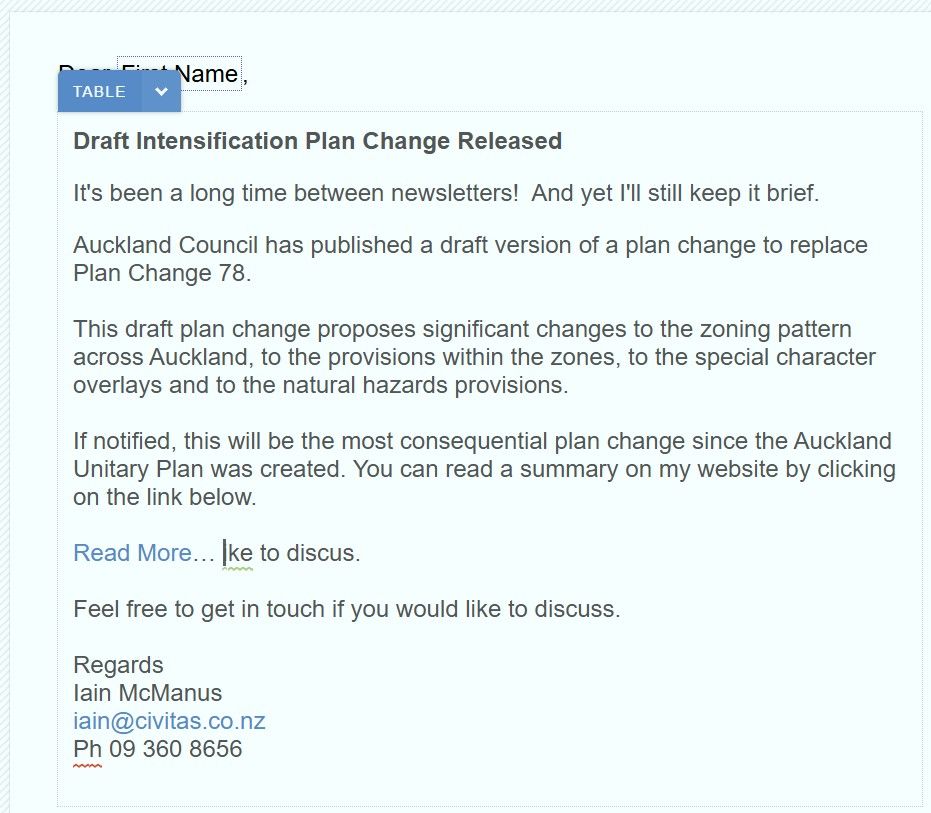
    Hi @iain I just checked your site and it looks like you got your email campaign sent off. I think what was happening there is you've pasted in a table from an email signature in Outlook or another system. That table has no borders so it is somewhat 'invisible'. When you are pressing Delete it is shifting the table to be on the same line as the "Read More" text. A little tip - you can press Control + Shift + V in Chrome to "Paste as Text". This ensures that any tables and other formatting elements are removed when you paste.
  • Forced Password Change

    Oncord Discussion
    2
    0 Votes
    2 Posts
    2k Views
    alex_cumberlandA
    @MrsAngell For a single contact - You can change the user's password via their contact profile. After you manually set a new password, there's a checkbox "Request change of password on next log in". It's worthwhile checking that there are no duplicate contacts using the same email with a password, because that may confuse things. If you need to handle this for a lot of contacts in bulk - there's a tool "Update Profile Email", which is available via Dashboard > Customers > Contacts, from the menu at the top of the page. This will create a drafted email for you to bulk send out (with auto-login links - so don't forward the e-mail).
  • 0 Votes
    2 Posts
    1k Views
    alex_cumberlandA
    @LF_Marketing Oncord doesn't support 2-factor login for general contacts trying to access a login-restricted website page sorry. 2-factor login is just used for administrators logging into the Oncord Dashboard. Worth noting - If you're embedding a third-party booking platform on the website, in this situation I'd say the booking app would likely handle 2FA login, rather than Oncord.
  • Payment Methods - Google Pay and Apple Pay

    Feature Requests
    1
    0 Votes
    1 Posts
    1k Views
    No one has replied
  • 0 Votes
    1 Posts
    1k Views
    No one has replied
  • 0 Votes
    2 Posts
    1k Views
    StephenBlignaultS
    @iwNZ See if you can get your answer from this page in the documentation: https://www.oncord.com/developer/api/controls/forms/dialogbox/
  • Related products - "You may also like.."

    Oncord Discussion
    2
    0 Votes
    2 Posts
    2k Views
    StephenBlignaultS
    @iwNZ Hi there. I have implemented at least 2 very popular methods in the past. Option 1: (Moderate) Show all products from the current category Option 2: (Advanced) Custom Field called Related Products Option 1: On product detail template: <logic:variable as="arrCategoryIds" value="[? \Components\Commerce\Products\Categories::getAllIdsForProduct($product['product_id']) ?]" /> <logic:variable as="category" value="[? \Components\Commerce\Products\Categories::get($arrCategoryIds[0]) ?]" /> <div class="categoryRow"> <h2>Category Products <small>([? $category['product_category_title'] ?])</small></h2> <div class="shop-grid"> <logic:variable as="currentProduct" value="[? $product ?]" /> <data:repeater id="grid-product" class="grid-product-wrap" as="product" datasource="\Components\Commerce\Products::getAllForCategoryAndBrandRecursive($category['product_category_id'], null)" paging="true" pagingrows="20" pagingautorender="true" > <data:template component="\Components\Commerce\Products" type="list" /> </data:repeater> <logic:variable as="product" value="[? $currentProduct ?]" /> </div> </div> Option 2: This option is a lot more complicated: step 1 you need to create a custom field called Related Product Ids. Use a Custom UI type, and choose Text < 255 Characters. step 2 then on each product you select your related products step 3 add a data:repeater on the product detail page to list through the related product ids, a lot like what I showed in option 1. Your Custom UI code should look like this, or similar: <forms:row label="Related Products"> <logic:variable as="selected_product_ids" value="[? [] ?]" /> <logic:if test="$product['product_related_products']"> <logic:variable as="selected_product_ids" value="[? unserialize( $product['product_related_products'] ) ?]" /> </logic:if> <forms:selectlist id="product_related_products" datacolumn="product_related_products" value="" as="relatedProduct" width="300" height="120" style="font-size: 80%;"> <forms:option value=""></forms:option> <data:repeater as="relatedProduct" datasource="\Components\Commerce\Products::getAllConsole()"> <logic:if test="in_array($relatedProduct['product_id'], $selected_product_ids, false)"> <forms:option value="[? $relatedProduct['product_id'] ?]" title="[? $relatedProduct['product_title'] ?]" selected="selected" /> </logic:if> <logic:else> <forms:option value="[? $relatedProduct['product_id'] ?]" title="[? $relatedProduct['product_title'] ?]" /> </logic:else> </data:repeater> </forms:selectlist> <p style="margin-top: 8px;"><em><small>Hold CMD or Ctrl to select multiple products</small></em></p> </forms:row> Hope this sets you on the right path.
  • Animations and options inside Oncords editor

    Feature Requests
    1
    0 Votes
    1 Posts
    1k Views
    No one has replied
  • Accidental footer as a header

    Oncord Discussion
    1
    0 Votes
    1 Posts
    1k Views
    No one has replied
  • 0 Votes
    1 Posts
    1k Views
    No one has replied
  • Bulk create photo gallery

    Oncord Discussion
    3
    0 Votes
    3 Posts
    2k Views
    J
    @kimguevarra Thank you. I can do some coding but, probably won't pursue that path. I've decided to use a built-for-purpose option with a cloud photo storage site and simply provide a link from my Oncord site. A little less elegant but, more robust and doesn't involve bespoke coding. Besides, I was looking at hundreds of hires photos and I think that would overload the storage capacity of the Oncord plan.
  • How to bulk add posts?

    Oncord Discussion
    2
    0 Votes
    2 Posts
    2k Views
    StephenBlignaultS
    Hi dhondup, There are several methods that could be used to bulk import posts, but it is a lot more trickier than the examples given in the bulk update scripts tutorial. But it can be done. Things to consider: Are all your imported posts going into the same post category, or different categories, or multiple categories? Will your posts link to pages, or products, or contacts or neither: link to no other resource - and live independently as just posts? Do you want to import your posts from a CSV file? If your imported posts are to additionally generate / create a Page, then you will need to have administrators login access when running the script (most likely this will be the case) As you can see there is lots of consider. But generally speaking, you should be able to generate a post using \Components\Website\Posts::save($arrEntity) https://www.oncord.com/developer/api/components/website/posts/ If you would like further help with this, the team at Fuel can help writing an import script to suit your specific needs, especially if your posts need to link to web pages too. You can find our contact details in the link in my profile bio. Thanks

  • Product Analytics

    Feature Requests
    1
    0 Votes
    1 Posts
    2k Views
    No one has replied
  • Post category titles and posts display logic

    Advanced Coding
    2
    0 Votes
    2 Posts
    3k Views
    K
    @Ben We currently have a tutorial on how to list post-category values. You can check it out here: Show Categories for a Post This guide will show you how to display all the categories associated with a post. If you only want to display the primary category, you can use the following code: \Components\Website\Posts\Categories::getColumn($post['post_category_id'], 'post_category_title') To check if there are posts in a category, you can use this code: <logic:if test="$post"> <p>West End:</p>
 <data:postrepeater paging="true" pagingrows="6" templatetype="list" postcategory="3" /> </logic:if>```
  • Integration - Facebook Leads

    Feature Requests
    1
    0 Votes
    1 Posts
    1k Views
    No one has replied